Exness Registration 2026: How to Open an Exness Account & Sign Up

Exness is a globally recognized online trading platform that provides access to Forex, cryptocurrencies, and other financial markets.
Most beginners fail to get their Exness account approved on the first try — not because the process is difficult, but because they upload incorrect documents or skip key verification steps.
In this updated guide, you’ll learn exactly how to register your Exness account, avoid common mistakes, and get verified as quickly as possible — often within 24 hours.
Whether you're using a phone or desktop, this guide will walk you through every step clearly and help you start trading faster.
👉 See full Exness guide: Exness Full Guide
📌 WHAT YOU NEED BEFORE REGISTERING AN EXNESS ACCOUNT
Before you start, prepare the following to avoid delays during registration and verification:
- A valid email address or phone number
- A government-issued ID (passport, ID card, or driver’s license)
- Proof of address (bank statement or utility bill)
- A stable internet connection
👉 Having these ready can significantly reduce verification time and help you avoid common mistakes.
🪜 HOW TO REGISTER AN EXNESS ACCOUNT STEP BY STEP
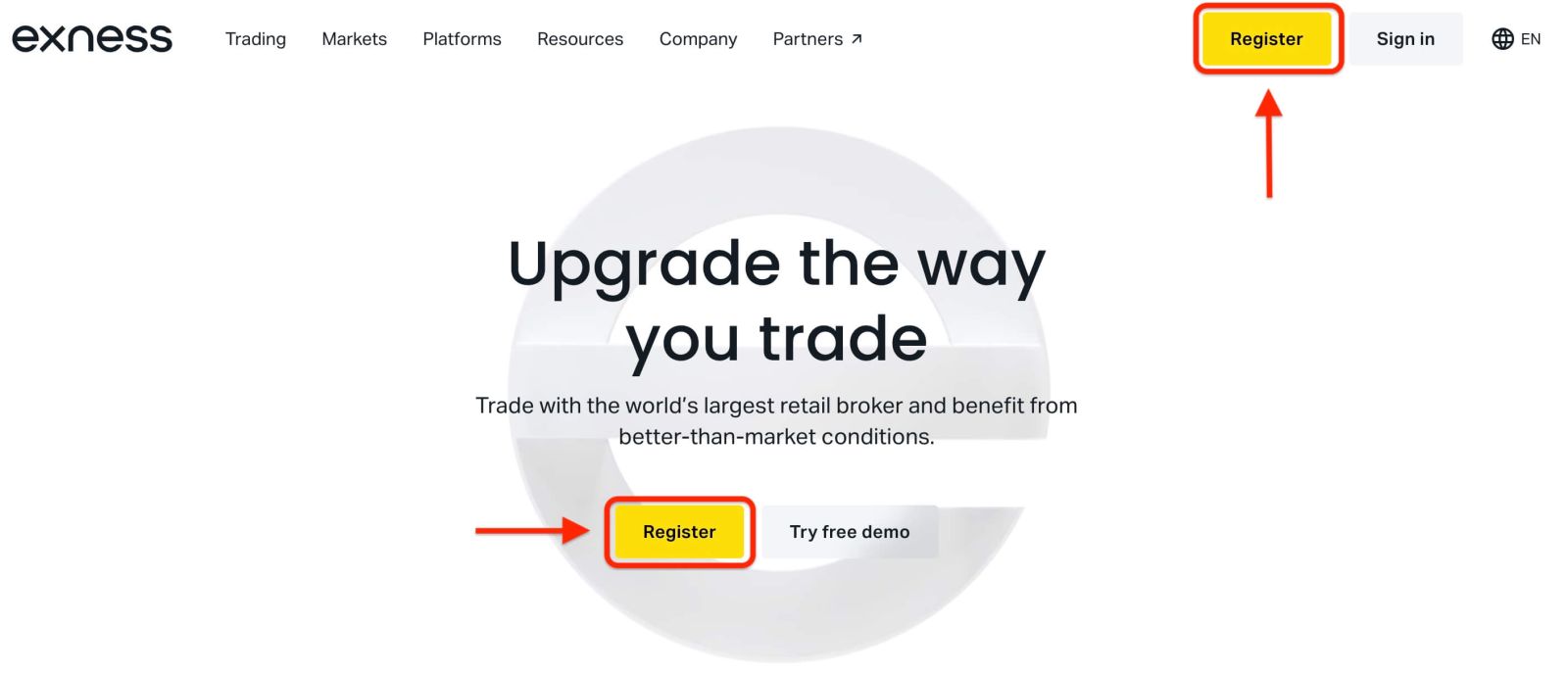
Step 1: Go to the official Exness website
Visit the official Exness website and click on the “Register” button to begin the account creation process.Make sure you are accessing the correct website to avoid phishing risks and ensure account security.
Step 2: Complete the Registration Form
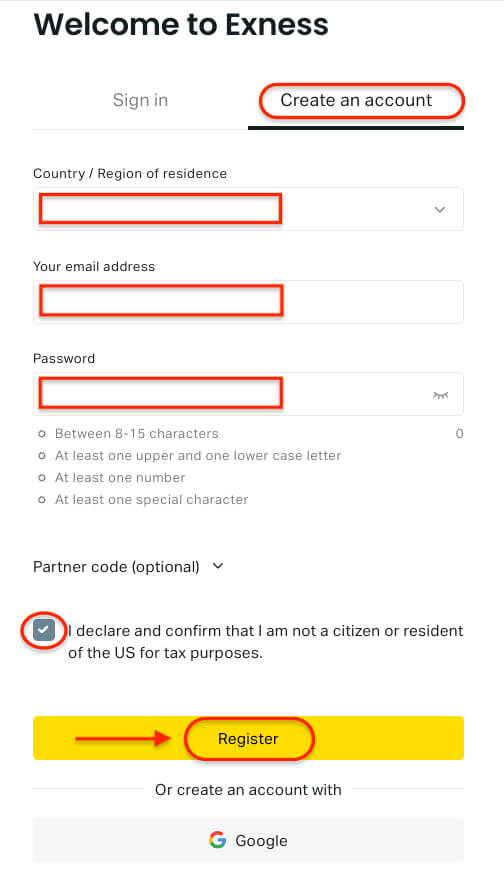
- Select your country of residence carefully, as this cannot be changed later and will affect available payment methods.
- Enter your email address and create a secure password that meets Exness requirements.
- You may also enter a partner code (optional). If the code is invalid, the system will automatically clear it.
- Confirm that you are not a U.S. citizen or resident (if required), then click “Register” to continue.
Step 3: Complete Your Exness Account Registration
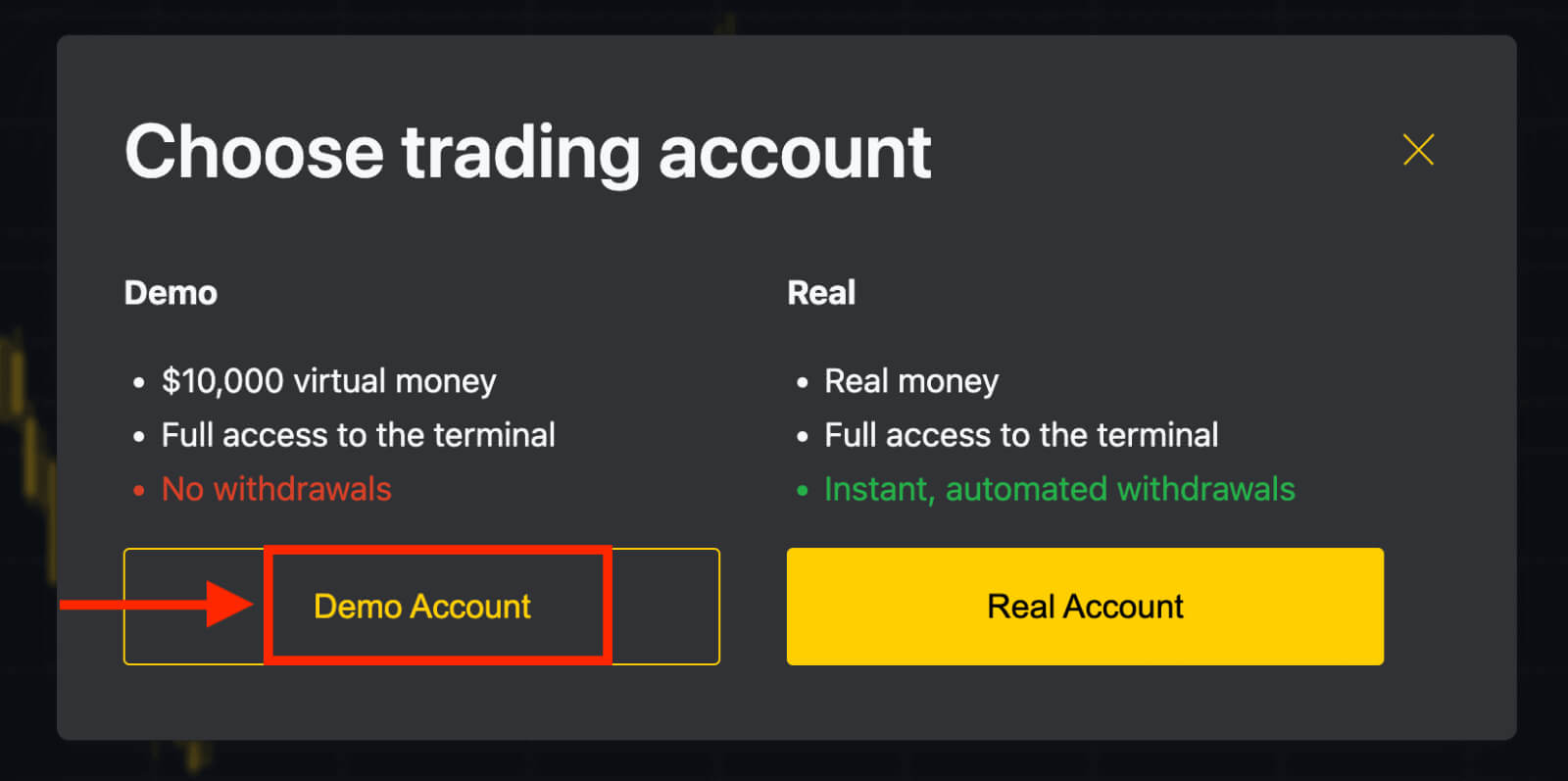
You have now successfully created your new Exness account and will be directed to Exness Terminal.- Click “Demo Account” to start trading with a demo balance.
- Exness instantly provides $10,000 virtual funds in your demo account—no additional registration needed.
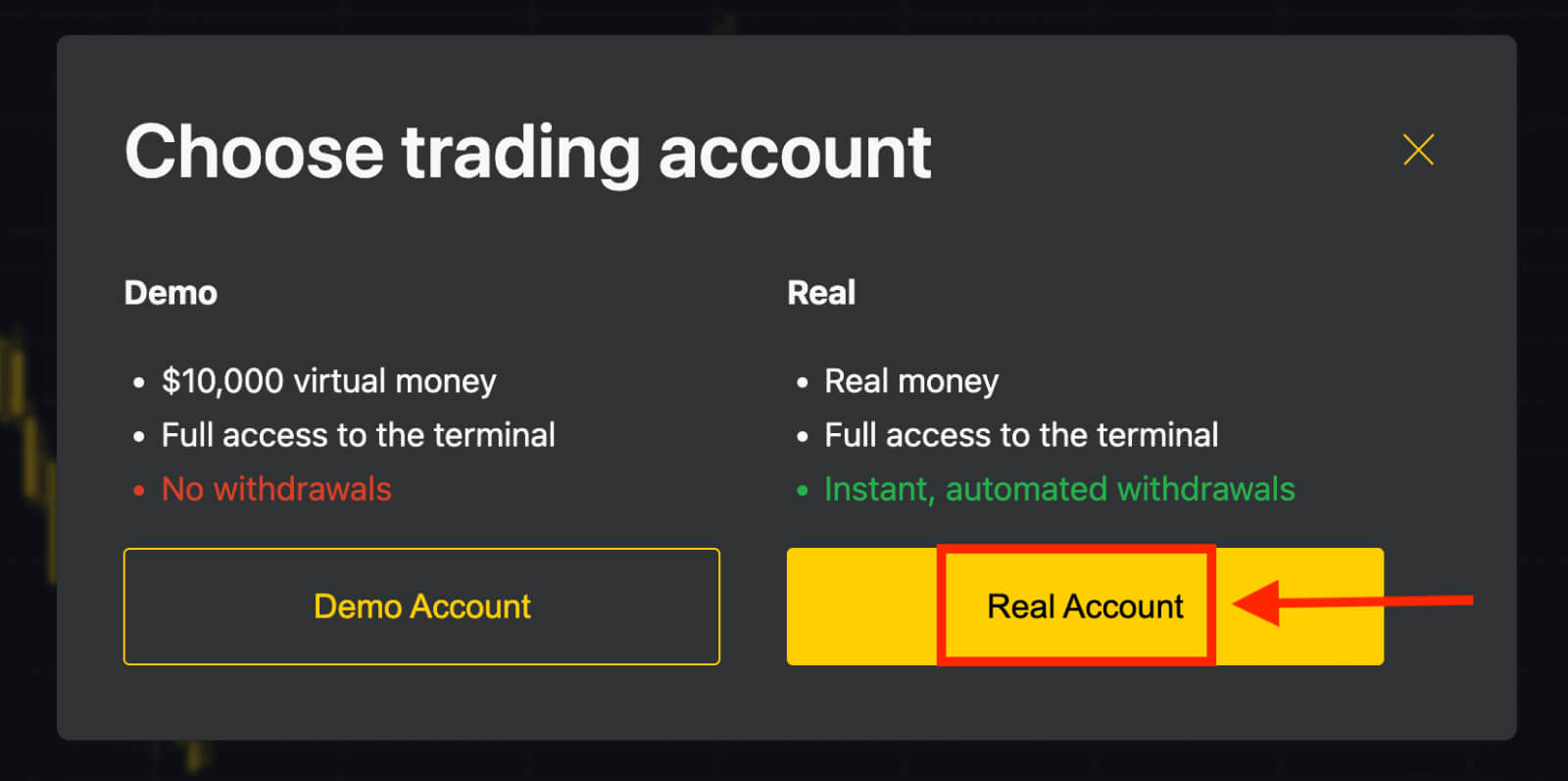
- To trade with real funds, click the yellow “Real Account” button and make your first deposit.
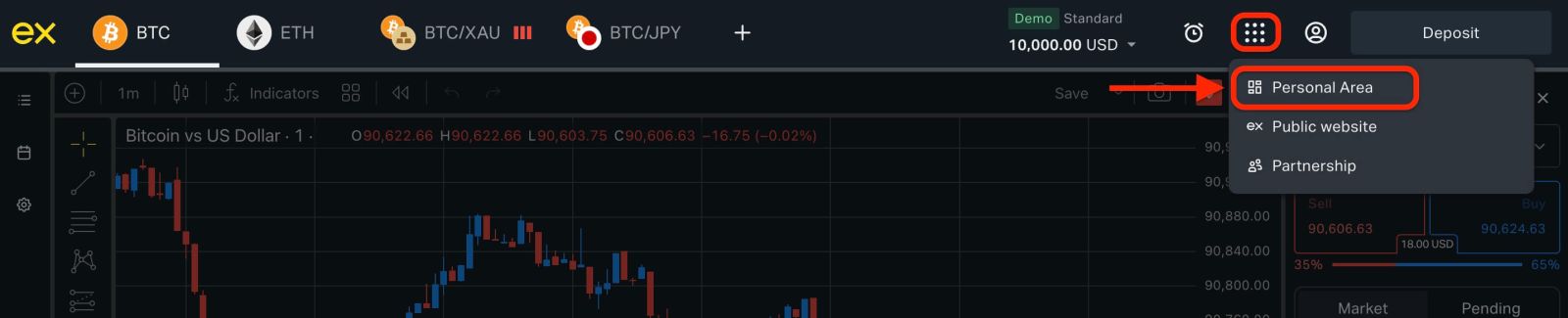
You can open additional trading accounts anytime from the Personal Area.
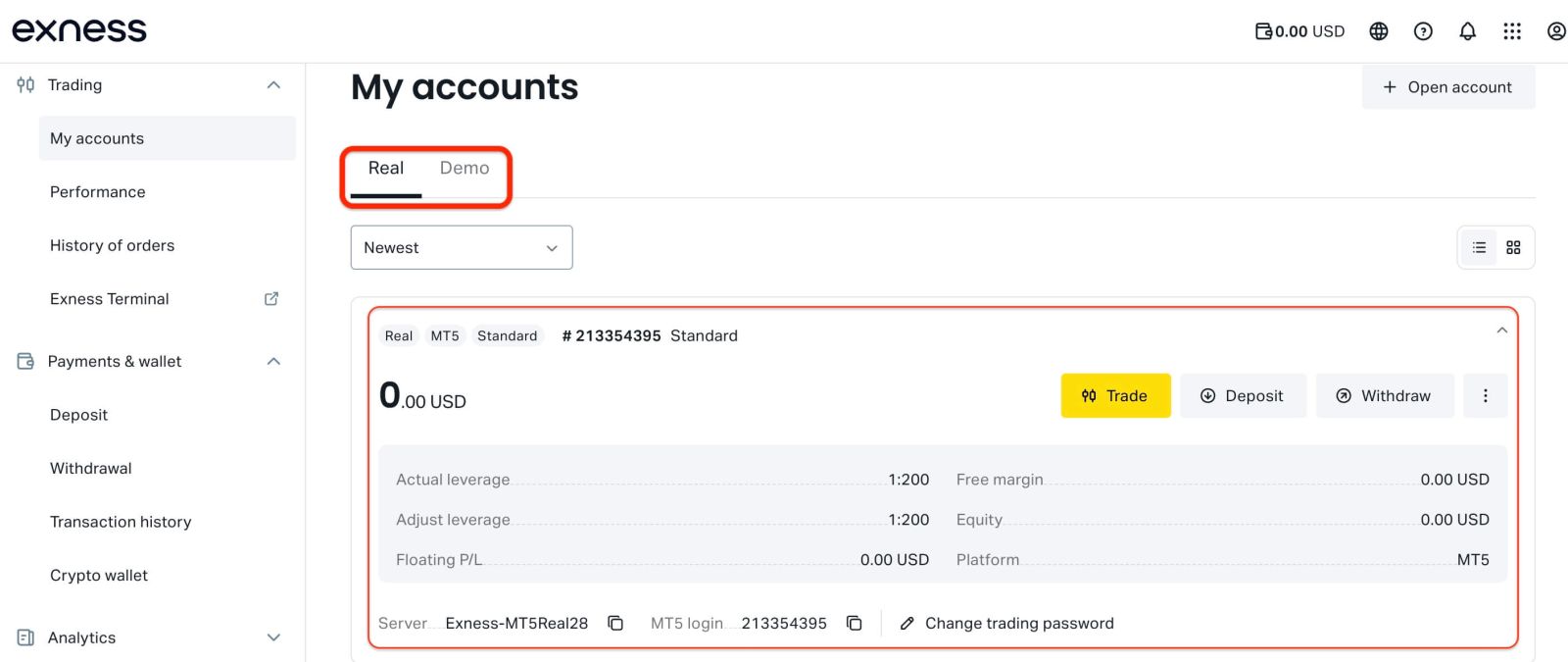
By default, your Personal Area includes:
- One real trading account (MT5)
- One demo trading account (MT5)
Exness registration is available anytime—start immediately and access all trading features faster by completing full Exness account verification.
🔥 EXNESS REGISTRATION EXPERIENCE
Based on recent testing, creating an Exness account takes less than 2 minutes.However, most delays occur during the verification stage, not registration itself.
The most common issues include uploading unclear documents, mismatched personal information, or using unsupported document types.
Accounts with clear ID images and accurate details are typically verified within 6–24 hours, while incorrect submissions may take several days or be rejected.
✅ HOW TO VERIFY YOUR EXNESS ACCOUNT
Verification is required to:
- unlock full trading features
- remove deposit/withdraw limits
Step 4: Verify your email phone
- Enter the code sent to your email
- Confirm your phone number
Step 5: Upload identity documents
Accepted documents include:
- Passport
- National ID
- Driver’s license
👉 Tips:
- Use high-quality images (no blur)
- Ensure all corners are visible
- Information must match your account details
Step 6: Upload proof of address
You can submit:
- Bank statement
- Electricity bill
- Internet bill
👉 Documents must be issued within the last 3–6 months.
⚠️ COMMON EXNESS REGISTRATION MISTAKES THAT DELAY VERIFICATION
Most users face delays due to simple but critical mistakes:
❌ Uploading blurry or cropped images
❌ Using expired documents
❌ Name mismatch between documents
❌ Incorrect or incomplete address
👉 These issues can delay verification by several days or lead to rejection.
⚡ PRO TIPS TO GET YOUR EXNESS ACCOUNT VERIFIED FAST
Based on real user experience:
- Use a passport instead of an ID card (higher approval rate)
- Submit documents during working hours
- Double-check all information before submitting
👉 In most cases, verification takes 6–24 hours if done correctly.
⏱️ EXNESS REGISTRATION TIME: HOW LONG DOES IT TAKE?
- Account creation: 1–2 minutes
- Verification: 6–24 hours
👉 Some users are verified in under 12 hours depending on document quality.
🔗 RELATED EXNESS GUIDES: LOGIN, DEPOSIT, WITHDRAWAL TRADING
To continue using Exness effectively:
- How to Login to Exness Account
- How to Deposit Money on Exness
- How to Withdraw from Exness
- How to Verify Your Exness Account
- How to Start Trading on Exness
🔥IS EXNESS REGISTRATION SAFE AND LEGAL?
Exness is a well-known trading platform used by millions of users worldwide.
However, availability and regulations depend on your country. Always check whether Exness services are supported in your region before registering.
🛡️ WHY TRUST THIS GUIDE?
This guide is based on real platform testing and updated according to Exness registration flow.All steps are verified to ensure accuracy, helping users avoid common mistakes and complete registration successfully.
CONCLUSION: START TRADING WITH CONFIDENCE ON EXNESS
Registering an Exness account is simple, but getting verified quickly requires attention to detail.
By following the steps and tips above, you can avoid delays and start trading within a day.
👉 Explore the full Exness system:
Exness Full Guide
This hub includes complete guides for registration, login, deposit, withdrawal, and trading.